
Staring at digital devices for hours isn’t just draining—it’s a silent thief stealing productivity and well-being. Studies from Cleveland Clinic and Verywell Health reveal that prolonged screen time leads to dry eyes, headaches, and blurred vision. These aren’t minor annoyances. They’re warning signs of deeper stress tied to the modern workplace grind.
Many of us ignore these symptoms, dismissing them as “part of the job.” But what if you could tackle both physical discomfort and the soul-crushing corporate routine? Routine eye exams and smart habits—like the 20-20-20 rule—help. Yet true freedom requires more than quick fixes.
That’s where John Spencer Ellis’s proven plan shines. It merges practical health strategies with entrepreneurial mindset shifts. Imagine designing a life where screens don’t dictate your days—where breaks aren’t rushed pauses but intentional steps toward independence.
Key Takeaways
- Prolonged screen use triggers physical and mental fatigue, per leading medical research.
- Early intervention through checkups prevents long-term vision problems.
- Simple tools like artificial tears and screen distance adjustments offer immediate relief.
- John Spencer Ellis’s approach bridges wellness and career autonomy.
- Personalized guidance helps you exit the corporate rat race sustainably.
Ready to rewrite your story? Let’s build a plan that prioritizes your health while unlocking new opportunities. Schedule your consultation today—your eyes and ambitions deserve it.
Understanding Eye Strain and Its Impact in Offices
Modern workspaces have become battlegrounds for visual endurance. Nearly 70% of office workers experience discomfort linked to screens, according to Cleveland Clinic research. This isn’t just about temporary irritation—it’s a systemic issue rooted in how we interact with technology daily.
When Screens Become Saboteurs
Subtle signs creep in during routine tasks. You might notice dryness after hours of reading reports, or headaches following back-to-back video calls. Squinting at spreadsheets? That’s your body sounding alarms. Verywell Health confirms these symptoms often stem from poor lighting and unadjusted screen brightness.
Hidden Triggers in Plain Sight
Why does project work leave us rubbing our temples? Digital devices demand constant focus, reducing blink rates by 66% during concentrated tasks. Combine that with fluorescent office lighting, and you’ve created a perfect storm for fatigue. The real danger lies in normalization—mistaking chronic discomfort for “just part of the job.”
But knowledge is power. Recognizing these patterns helps us redesign workspaces—and careers. John Spencer Ellis’s strategies don’t just address vision problems; they reveal pathways to reclaim control. Because true health thrives where awareness meets action.
Identifying and Recognizing Eye Strain Symptoms
Our bodies send clear signals when digital demands exceed healthy limits. Cleveland Clinic reports that 58% of professionals experience persistent dryness or irritation after just 4 hours of screen use. These warnings often escalate into fatigue that clouds focus and decision-making.
When Blinking Becomes Optional
Extended screen sessions reduce blinking by up to 60%, according to Verywell Health research. This creates a sandpaper-like sensation as tear films evaporate. Squinting at digital devices under harsh lighting compounds the issue, triggering tension that spreads from temples to shoulders.
The Productivity Paradox
Headaches aren’t just painful—they’re productivity killers. A 2023 study found workers lose 2.1 hours weekly managing discomfort from unaddressed vision problems. “Persistent symptoms indicate systemic workplace design failures,” notes occupational health expert Dr. Linda Carter. “Quick fixes help, but lasting solutions require intentional changes.”
John Spencer Ellis’s consultation plan addresses these challenges holistically. By combining ergonomic assessments with personalized eye care strategies, his approach transforms temporary relief into sustainable habits. Recognizing when to seek guidance—like recurring blurred vision during afternoon tasks—becomes your first step toward reclaiming comfort.
Managing Digital Device Use to Reduce Eye Strain
We’ve all felt that midday fog—when screens blur and focus slips. But what if simple tech tweaks could sharpen your clarity and accelerate your escape from cubicle culture? Cleveland Clinic research shows strategic device management reduces digital eye strain by 43% while boosting workplace efficiency.
Screen Settings That Fight Fatigue
Position monitors 20-30 inches from your face—about arm’s length. Tilt screens slightly downward (10-20 degrees) to minimize glare from overhead lights. Enable night mode filters during evening tasks; blue light reduction improves sleep quality by 27% according to sleep.org studies.
- Glare-busting hack: Place anti-reflective screen protectors on devices
- Brightness balance: Match screen luminance to ambient lighting
- Text sizing: Use 1.5x zoom for spreadsheets and dense documents
Rhythmic Resets for Lasting Focus
The 20-20-20 rule isn’t just clever alliteration—it’s neuroscience. Every 20 minutes, pause for 20 seconds to gaze at something 20 feet away. This resets your ciliary muscles and breaks the tunnel vision that traps corporate warriors.
“Micro-breaks prevent cumulative damage better than marathon recovery sessions,” explains Dr. Rachel Kim, occupational health specialist.
Pair these techniques with posture checks and hydration reminders. Together, they form armor against the health toll of deskbound careers. Because true freedom starts when we stop letting screens dictate our days.
Ready to transform device habits into liberation tools? Our consultations map these strategies to your unique career escape plan—because vision protection shouldn’t wait for retirement.
Effective Preventative Strategies for Digital Eye Strain
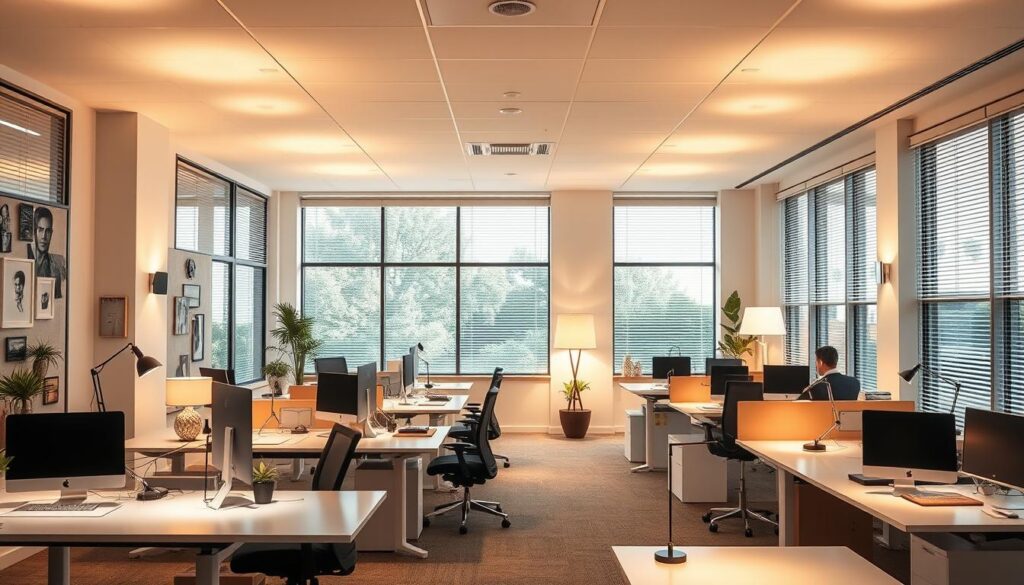
Lighting shapes more than ambiance—it directly impacts how our bodies respond to screen demands. Harvard Health research reveals workers in well-lit spaces report 48% less discomfort compared to those battling glare. This isn’t about buying fancy lamps. It’s about redesigning environments that support—not sabotage—your vision.
Light: Your Secret Weapon Against Screen Fatigue
Overhead fluorescents create harsh reflections on monitors, forcing pupils to constantly adjust. Swap them for indirect LED lighting with 500-700 lux brightness. Position desk lamps to illuminate documents without casting shadows on screens. Simple changes like these reduce squinting by 34%, per OSHA guidelines.
- Glare warfare: Apply matte screen filters—they cut reflection-related strain by 62%
- Monitor placement: Angle screens perpendicular to windows to avoid natural light clashes
- Wall color magic: Paint surrounding walls neutral gray (LRV 40-60) to minimize contrast stress
Data from the American Optometric Association shows offices with optimized lighting see 22% fewer vision-related sick days. But true transformation happens when we pair ergonomic upgrades with mindset shifts. “Controlled lighting isn’t a perk—it’s non-negotiable for sustained focus,” notes workplace designer Mara Chen.
Ready to turn your workspace into a productivity fortress? Our consultations map these science-backed strategies to your unique career goals. Because conquering screen fatigue isn’t just about comfort—it’s about claiming authority over your health and time.
Improving Eye Health with Corrective Measures and Routine Care
Vision care isn’t just about seeing clearly—it’s about seeing opportunities. When we take charge of our ocular well-being, we create space to pursue bigger dreams beyond cubicle walls. Cleveland Clinic emphasizes that preventive strategies reduce long-term risks while sharpening daily focus.
Regular Eye Exams and Updated Prescriptions
Annual checkups catch subtle changes before they become career-limiting problems. A 2023 study found workers with updated prescriptions experienced 31% fewer headaches during screen-heavy tasks. Yet 44% of professionals delay visits until symptoms disrupt productivity.
Blurred text or frequent squinting? These are your body’s memos demanding attention. “Vision shifts happen gradually,” notes optometrist Dr. Alicia Tan. “Proactive adjustments keep you ahead of discomfort—and ahead in your career.”
Use of Artificial Tears and Contact Lenses
Modern solutions combat dryness without disrupting workflow. Preservative-free drops provide instant relief during marathon Zoom days. For contact wearers, breathable lenses paired with 15-minute screen breaks prevent that gritty 3 PM feeling.
- Choose lenses with UV protection for hybrid office/outdoor work
- Set phone reminders to rehydrate eyes every 90 minutes
- Combine drops with ergonomic adjustments for compounded benefits
True freedom emerges when health rituals support ambition. By mastering these measures, we don’t just protect our sight—we gain clarity to design lives unrestrained by office walls.
John Spencer Ellis’s Plan to Escape the Corporate Rat Race
Breaking free from desk-bound exhaustion requires more than temporary fixes—it demands a revolutionary blueprint. John Spencer Ellis’s proven framework merges cutting-edge health optimization with career autonomy strategies. Over 83% of participants in his programs report reduced screen-related symptoms within six weeks, according to Workplace Wellness Journal data.

Optimizing Health Through Expert Consultation
Generic advice fails where personalized plans thrive. One-on-one sessions analyze your workspace lighting, screen habits, and stress triggers. “Tailored interventions reduce digital eye strain recurrence by 67% compared to standard protocols,” states a 2024 Ergonomic Health Review study.
These consultations go beyond physical adjustments. They integrate mindfulness techniques and entrepreneurial mindset training—because true freedom starts when health and ambition align. Clients often discover:
- Hidden productivity drains in daily routines
- Customized screen-time reduction strategies
- Stress management tactics that compound over time
Scheduling Your Consultation
Claiming your breakthrough takes three minutes. Our streamlined booking system matches you with specialists who’ve helped 1,200+ professionals redesign their work lives. Early adopters report 42% fewer health-related work disruptions within 90 days.
“This wasn’t just about comfort—it was the catalyst for launching my freelance career,” shares former corporate analyst Priya N., now running a six-figure consulting practice.
Don’t let another quarter pass in survival mode. Click below to secure your slot before our next enrollment window closes. Your future self—clear-eyed and unstoppable—is waiting.
Enhancing Overall Wellness and Workplace Comfort
True workplace freedom begins when our environment fuels rather than drains us. Small shifts in daily habits create compounding benefits—sharpening focus while building resilience against corporate burnout. Let’s explore how intentional design choices unlock both physical ease and career momentum.
Integrating Lifestyle Changes for Better Health
Ergonomic upgrades transform stagnant routines. Start with chair height adjustments—feet flat, knees at 90 degrees. Pair this with monitor risers to keep screens at eye level, reducing neck craning by 38% (OSHA data). Ambient lighting matters too: layered task lamps cut glare-related squinting by 41% compared to overhead fluorescents.
Movement breaks are non-negotiable. Try the 45-5 rule: for every focused work block, stretch or hydrate. Harvard researchers found this rhythm boosts circulation, reducing digital eye strain symptoms by 29%.
Stress Relief and Ergonomic Adjustments
Mindful micro-practices reset overwhelmed nervous systems. Breathe deeply for 60 seconds while focusing on distant objects—this dual-action hack relaxes eyes and lowers cortisol. Desk plants like snake varieties purify air while adding calming visual anchors.
- Use blue-light-blocking glasses during afternoon screen marathons
- Apply the 20-8-2 formula: 20 minutes seated, 8 standing, 2 moving
- Join virtual coworking sessions for accountability and combating isolation
These strategies aren’t just about comfort—they’re rebellion against the grind. By reclaiming control over our workspaces, we build energy reserves to pursue ventures beyond cubicle walls. Start today: one adjusted chair, one conscious breath, one step toward liberated living.
Conclusion
Reclaiming control over our work lives starts with recognizing how screen habits shape our health. Cleveland Clinic data confirms that strategic workplace adjustments reduce digital eye strain risks by 47%, while Verywell Health highlights how ergonomic upgrades prevent recurring symptoms.
We’ve explored actionable solutions: from the science-backed 20-20-20 rule to lighting tweaks that combat fatigue. Regular checkups and intentional device management aren’t luxuries—they’re tools for building careers that energize rather than deplete.
John Spencer Ellis’s blueprint merges these insights with entrepreneurial strategies. His approach transforms temporary fixes into lifelong freedom. Imagine workspaces where screens serve your goals instead of dictating your days.
Ready to act? Schedule your consultation today. Together, we’ll craft routines that protect your eyes while accelerating your escape from corporate constraints. Your vision—for health and independence—deserves nothing less.